

Find the right course. On the right date.
Course Atlas is a searchable calendar of published training courses in Singapore. Compare dates, providers, teaching languages and fees in one view.
Course Atlas is in preview and opens on a test address.
Every provider. One calendar.
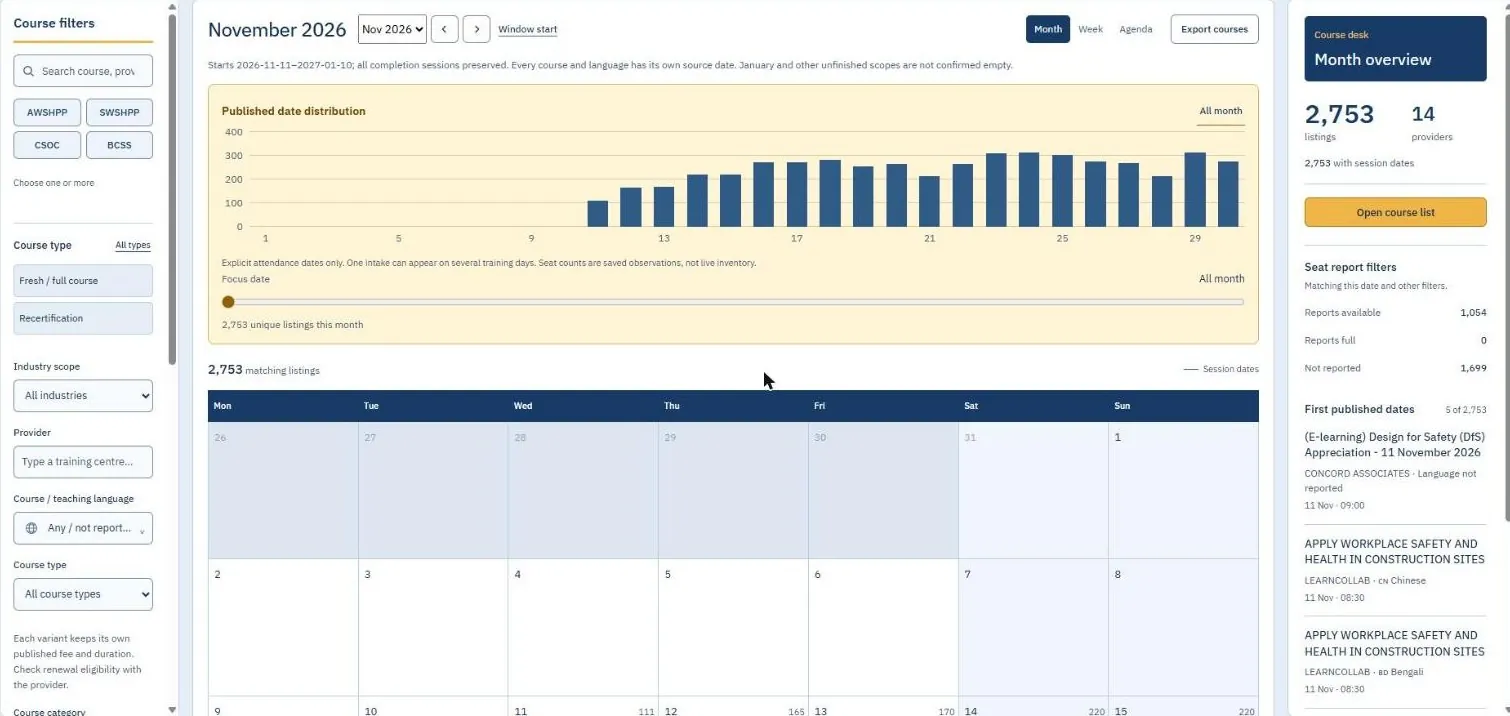
A month of courses on one screen
Every published session from the included providers, laid out by date.
Filter to what is usable
Course type, industry, provider and teaching language narrow thousands of listings to the few that fit.
See the busy and quiet days
The date distribution shows how many sessions are published on each day of the month.
Know what you are looking at
The month overview counts listings and providers, and lists the first published dates with their language.
Use Course Atlas here.
The live calendar loads into this page. Filter by course, language and day, then shortlist what fits.
What Course Atlas is, and the problem it is for
A training coordinator's question is rarely just which course. It is which course, in which language, on a date this worker is free, before their certificate expires. Answering it today means opening each training provider's website in turn, or sending the same message to five of them and waiting.
Course Atlas gathers published course dates from Singapore training providers into one searchable calendar. You can see every session of a course across providers on one month view, filter it down to the language and the days that work, and shortlist the ones worth asking about.
It is deliberately honest about what it is: a snapshot of published information, with every listing linked back to its source. It does not take bookings or payment. In the November 2026 snapshot it held 2,753 listings from 14 providers.
What it does, function by function
- Four viewsCalendar, list, map, coverage
- A month, week or agenda calendar of sessions; a sortable course list; a map of training centres; and a provider coverage view that shows which providers are included.
- FiltersNarrow to what is usable
- Filter by course type (fresh or full course against recertification), industry scope, provider, teaching language, training mode, seat availability, published fee ceiling and days of the week. Common courses have one-tap chips.
- Date distributionSee the busy and quiet days
- A chart shows how published sessions are spread across the month, which makes it easy to spot the dates with the most choice.
- Shortlist and booking requestKeep the candidates together
- Courses can be shortlisted and gathered into a booking request list, ready to take to the provider.
- ExportTake it with you
- The current selection exports to CSV, to an ICS calendar file, or to JSON.
- Source-linked listingsCheck it at the source
- Each listing links to the provider's own page, shows explicit attendance dates, and labels seat counts as saved observations with the date they were seen.
- LanguagesInterface in three languages
- The interface is available in English, Simplified Chinese and Traditional Chinese, and courses can be filtered by their teaching language.
Who it is for. Training coordinators, employers and workers in Singapore who book safety and trade courses often and across more than one provider.
How it compares with the usual alternatives
| Criterion | Course Atlas | Each provider's own website | Phoning or messaging providers | A coordinator's own spreadsheet |
|---|---|---|---|---|
| Comparing across providers | One calendar holds every included provider | One site at a time, each laid out differently | One conversation at a time | Only what someone has typed in |
| Finding a date that fits | Filter by days of the week and see the month at once | Scroll each provider's schedule | Ask, then wait for a reply | Depends on how fresh the sheet is |
| Teaching language | A filter | Sometimes listed, often per course page | You have to ask | If someone recorded it |
| Seat availability | A saved observation, not live | Live, where the provider publishes it | The most reliable answer | Usually out of date |
| Booking and payment | Not handled; you confirm with the provider | Direct | Direct | Not applicable |
| Which providers are covered | Only those included so far | That provider, completely | Anyone you can reach | Whoever you already know |
| Effort to keep current | Maintained for you as snapshots | None, but you repeat the search every time | Repeated for every booking | All yours |
The comparison is against the typical setup in each category, not a named product. Individual products and agencies differ, so check the ones you are considering.
Where Course Atlas is stronger
- One view across providers. The comparison that used to take several browser tabs happens on one calendar.
- It starts from the date. It answers the question coordinators really have, which is when, not just what.
- Language is a filter. Finding a session in the right teaching language takes one click, not five enquiries.
- You can take the result away. CSV, calendar and JSON exports fit into whatever you already use.
- It shows its working. Listings link to their source, and observations are labelled as observations.